The Basics
Creating a new locality
OpenAVMKit operates on the concept of a "locality", which is a geographic area that contains a set of properties. This can represent a city, a county, a neighborhood, or any other region or jurisdiction you want to analyze. To set one up, create a folder like this within openavmkit's notebooks/pipeline/ directory:
notebooks/pipeline/data/<locality_slug>/
Where <locality_slug> is a unique identifying name for your locality in a particularly opinionated format. That format is:
<country_code>-<state_or_province_code>-<locality_name>
-
Country code: The 2-letter country code according to the ISO 3166-1 standard. For example, the country code for the United States is
us, and the country code for Norway isno. -
State/province code: The 2-letter state or province code according to the ISO 3166-2 standard. For example, the state code for Texas is
tx, and the state code for California isca. -
Locality name: A human-readable name for the locality itself. This follows no particular standard and is entirely up to you.
-
No dashes except between the above: The dashes are used for separation, so please don't include any WITHIN e.g. your locality name. So
us-ny-new-york-cityis not a good idea, butus-ny-new_york_cityorus-ny-nycorus-ny-newyorkcityis fine.
The slug itself should be all lowercase and contain no spaces or special characters other than underscores.
Some examples:
us-nc-guilford    # Guilford County, North Carolina, USA
us-tx-austin      # City of Austin, Texas, USA
no-03-oslo        # City of Oslo, Norway
no-50-orkdal      # Orkdal kommune (county), Norway
Once you have your locality set up, you will want to set it up like this (using the non-existant us-tx-imaginarycounty as an example):
notebooks/
├──pipeline/
   ├──data/
      ├──us-tx-imaginarycounty/
         ├── in/
             ├── settings.json
         ├── out/
The in/ directory is where you will put your raw data files.
The out/ directory is where the output files will be saved.
The settings.json file will drive all your modeling and analysis decisions for the library. For now you can just start with a "blank" file that contains a single pair of open and close curly braces like this:
{}
That will be sufficient to get the file to load, but you will want to consult the documentation / tutorials for how to construct this file.
Code modules
Here's how you can import and use the core modules directly in your own Python code.
For instance, here's a simple example that demonstrates how to calculate the Coefficient of Dispersion (COD) for a list of ratios:
import openavmkit

ratios = [0.8, 0.9, 1.0, 1.1, 1.2]
cod = openavmkit.utilities.stats.calc_cod(ratios)
print(cod)
You can also specify the specific module you want to import:
from openavmkit.utilities import stats

ratios = [0.8, 0.9, 1.0, 1.1, 1.2]
cod = stats.calc_cod(ratios)
Or even import specific functions directly:
from openavmkit.utilities.stats import calc_cod

ratios = [0.8, 0.9, 1.0, 1.1, 1.2]
cod = calc_cod(ratios)
Using the Jupyter Notebooks
Make sure that you've already installed the jupyter library. If not, see Getting Started for instructions.
The notebooks/ directory contains several pre-written Jupyter notebooks that demonstrate how to use the library interactively. These notebooks are especially useful for new users, as they contain step-by-step explanations and examples.
- Launch the Jupyter notebook server:
jupyter notebook
This should open a new tab in your web browser with the Jupyter interface.
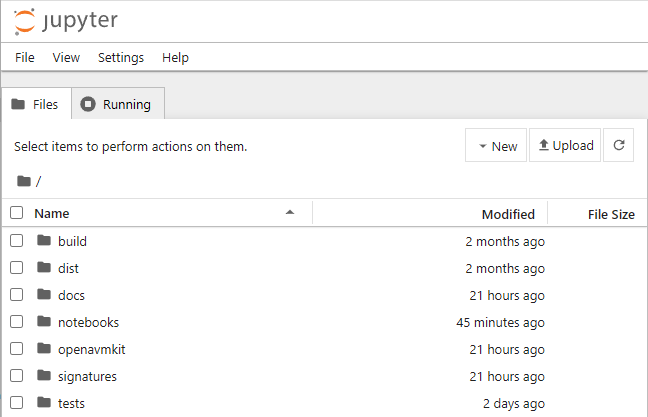
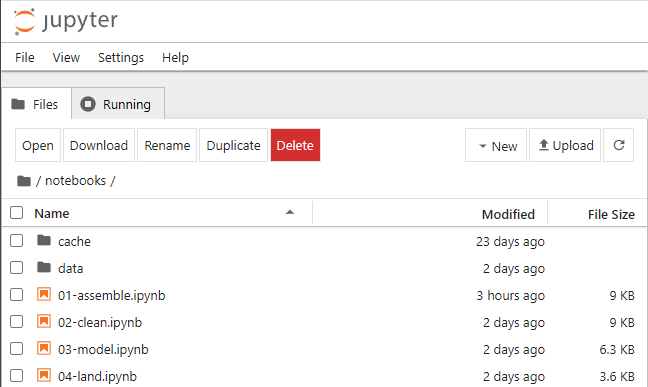
- Navigate to the
notebooks/directory in the Jupyter interface and open the notebook you want to run.
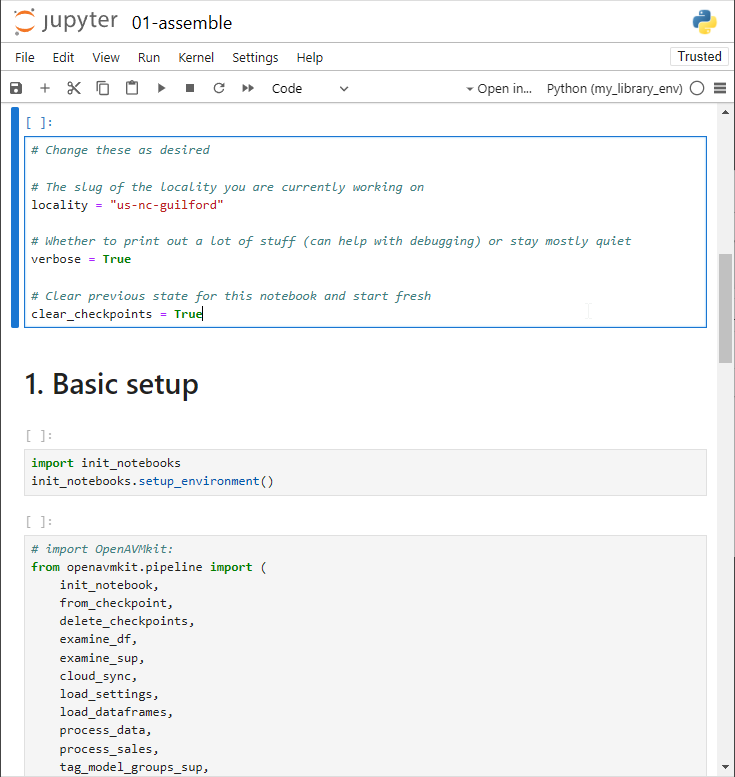
- Double-click on your chosen notebook to open it.
For information on how to use Jupyter notebooks in general, refer to the official Jupyter notebook documentation.
For an overview of which notebook to run when, see notebooks/README.md.
Where to go from here
Once you have a locality set up and the basics down, dig into:
- Build a jurisdiction from scratch (tutorial) — end-to-end walkthrough from raw data to a working AVM. The recommended next read.
- The pipeline notebooks —
01-assemble,02-clean,03-model,assessment_quality. Run them in order on a real locality. - Recipe — public function reference, organized by pipeline stage.
- Advanced settings reference — the settings.json preprocessor (
__comments,$$references, template merging,!/+flags), plus high-impact settings most users discover only by reading source. Read this once before writing your own settings file. - Configuration — environment-level setup (
.env, cloud storage, Census API keys, PDF generation).
If you're a coding agent or contributor, also read AGENTS.md at the repo root — it captures repo-wide conventions and gotchas.
Terminology
Consider the word "property" -- is this furniture, a piece of real estate, or a characteristic like height? In layman's terms it could mean any of those. For the avoidance of confusion in cases like this, we take pains to choose very specific terminology.
Parcel
The fundamental unit of real estate. In this context, each row in a modeling dataframe typically represents a single parcel. In the context of OpenAVMKit, a "parcel" means a piece of land as well as any and all improvements that sit upon it. Think of it as a "package" of real estate.
Building
A freestanding structure or dwelling on a parcel. A parcel can have multiple buildings. A building is an improvement, but not every improvement is a building.
Improvement
Any non-moveable physical structure that improves the value of the parcel. This includes buildings, but also other structures like fences, pools, or sheds. The term "improvement" also includes things like landscaping, paved driveways, and, in agricultural contexts, irrigation, crops, orchards, timber trees, etc.
Model group
A named grouping of parcels that share similar characteristics and, most importantly, prospective buyers and sellers, and are therefore valued using the same model. For example, a model group might be "Single Family Residential" or "Commercial".
Characteristics
Characteristic
A feature of a parcel that affects its value. This can be a physical characteristic like square footage, or a locational characteristic like proximity to a park. Characteristics come in three flavors -- categorical, numeric, and boolean.
Categorical characteristic
A characteristic that has a defined set of values. For example, "zoning" might be a categorical characteristic with values like "residential", "commercial", "industrial", etc.
Numeric characteristic
A characteristic that can take on any numeric value. For example, "finished square footage" might be a numeric characteristic.
Boolean characteristic
A characteristic that can take on one of two values, "true" or "false". Example: "has a swimming pool" is boolean, whereas "size of swimming pool" is numeric.
Value
Prediction / Valuation
An opinion of the value of a parcel.
Full market value
The price a parcel would sell for in an open market, between a willing buyer and a willing seller when neither is under duress and both have equal information. In a modeling context, this is the value we are trying to predict.
Valuation date
The date for which the value is being predicted. This is typically January 1st of the upcoming year, but it can vary with locality.
Improvement value
The portion of the full market value due solely to the improvement(s) on a parcel. This excludes the value of the land.
Land value
The portion of the full market value due solely to the land itself, without any improvements. This excludes the value of any and all improvements.
Data sets
Data set
This refers to any collection of parcel records grouped together by some criteria.
Sales set / Study set
This refers to the subset of parcels that have a valid sale within the study period. We will use these to train our models as well as to evaluate them.
Training set
The portion of the sales set (typically 80%) that we use to train our models from.
Test set
The portion of the sale set (typically 20%) that we set aside to evaluate our models. These are sales that the predictive models have never seen before.
Universe set
The full set of parcels in the jurisdiction, regardless of whether the parcels have sold or not. This is the data set we will generate predictions for.
Post-valuation holdout
Sales that occurred after the valuation date. Our models never train on these, so they are a genuinely out-of-sample test. They are also the only sales that are out-of-sample for the assessor — see below.
Comparing against the assessor
When we report ratio-study statistics, we also show the assessor's existing values alongside ours for comparison. These head-to-head numbers are useful, but interpret them with one thing in mind: the holdout discipline we apply to our own models does not automatically apply to values we didn't generate. This is an information gap — it just means the two columns aren't always answering the same question.
- Our models are evaluated on sales they never saw during training (out-of-sample). For a third party's roll, we generally cannot know whether those same sales informed the values. If they did, the roll's figures reflect an in-sample fit rather than an out-of-sample test — a different test, not necessarily better or worse work.
- Because of this, by default the assessor is left off the random pre-valuation "Test set": that holdout is one we draw ourselves, and there is no reason to expect a third party held out the same sales (or any). A head-to-head there would not be like-for-like.
- The assessor is shown on (1) the Study set — an IAAO-style audit of the finished roll against all sales, which has no holdout requirement — and (2) the post-valuation holdout, which is out-of-sample for both parties.
- The post-valuation comparison is only meaningful if the valuation date is aligned with the roll-close date of the values being compared. openavmkit uses a single
valuation_date; if you want a like-for-like comparison, set it to match the date the compared roll closed. Aligning them is your responsibility.
To help interpret a very tight assessor result, the ratio study report includes a sales-chasing check (see the tutorial). Note that the checker cannot by itself prove sales-chasing, it can only detect likely signs of it; final judgment rests with you.
When you are the assessor
If you are the assessor (or otherwise know the holdout status of the values being compared), you can tell openavmkit to include assessor valuations in the random "Test set" head-to-head. Set analysis.ratio_study.assessor_holdout to "shared", which declares that the assessor's values honor the same test holdout openavmkit uses. You have two ways to make that true:
- Use openavmkit's generated holdout. Let openavmkit draw the test/train split as usual, and ensure your own values were produced without using the held-out sales (that is, your models were trained on a set of sales records that excluded the test keys). Then set
assessor_holdout: "shared". - Supply your own holdout. If your roll was built holding out a specific set of sales, put a CSV of those sale keys in your
in/folder and pointmodeling.instructions.test_keys_fileat it. openavmkit will use those keys as the canonical test set (training on everything else, never on post-valuation sales), so both your roll and openavmkit's models are scored on the same genuinely held-out sales. Setassessor_holdout: "shared"as well.
The file is a single-column CSV with the header key_sale — the sale-level key (one row per held-out sale), matching openavmkit's own out/models/<model_group>/_data/test_keys.csv. For example:
csv
  key_sale
  2021-00012345
  2021-00067890
  2022-00004567
Keys can span all model groups; openavmkit matches each against the sales in the relevant group. (If the file has no key_sale header, the first column is used.)
The default ("unknown") is the conservative choice for the common case where the comparison roll comes from someone else.
SalesUniversePair set
In any OpenAVMKit model, this refers to a data set created by merging together "Sales" set and the "Universe" set. We use this data structure to make sure that both the "sales" and "universe" data set are processed together in a consistent manner.
Modeling
Main
In any OpenAVMKit model run, the "main" model is the primary model. It operates on the full data set, and predicts full market value.
Vacant
In any OpenAVMKit model run, the "vacant" model is a secondary model that trains and predicts separately. It is trained only on sales of vacant land, but is used to predict the value of all parcels. The prediction it generates is solely for land value, not full market value.
Avoid these terms
These terms are ambiguous and can refer to different things in different contexts, so we avoid them in our documentation.
Property
In casual conversation this can mean a parcel, a building, or a piece of land. But in the context of coding, it can also refer to a characteristic or variable.